Wednesday, 5 October 2022

8-bit joystick adapter using Arduino

One day, I was looking for a 9-pin joystick ("Atari" or "Kempston") to modern PC adapter. After some disappointments, I googled for a comparable DIY Arduino project and found what I wanted from here:

https://hackaday.io/project/9552-digital-joystick-8-bit-to-usb-adapter

There isn't anything to code, as the functioning joystick examples are already supplied with the library. But as the instructions are a little on the short side I thought I'd add my experiences.

Firstly, the Arduino I had installed from the Linux repository was too old. Most of my time was wasted trying to get the library to work, whereas if I'd just downloaded the latest IDE, I could have added the library very easily.

One way to do this is to download the library as a zip, then use the Add .ZIP library function from the Arduino IDE menu. It's possible the IDE may need to be re-run. If the library has been installed, the GamepadExample can be selected from the File -> Examples -> Joystick submenu.

Not just any Arduino board can do this. Arduino Micro and Leonardo are seen as HID devices, so they can pretend to be joysticks, mice and keyboards depending on what you tell them to do. I had to buy an Arduino Micro to even try this.

ArcadeStickExample may sound attractive, but it requires an Arduino Micro Pro instead! Obviously a single-button arcade style joystick could work here.

The hackaday page isn't very explicit about which wires to connect to which pins, although the GamepadExample.ino will give some pointers.

Adapter port view pins:

 1 - Up to Arduino digital pin 2
 2 - Down to Arduino digital pin 4
 3 - Left to Arduino digital pin 5
 4 - Right to Arduino digital pin 3
 5 - Not Connected
 6 - Fire to Arduino digital pin 6
 7 - 5V (Not Connected)
 8 - GND to Arduino GND
 9 - Not Connected

I'm unsure of connecting the 5V to Arduino 5V, it looks like it was enough to connect the ground (GND).

It's also possible to have multiple joysticks, but I don't need that now.

Quick and unscientific lag-test: On Vice 64 I tried Buck Rogers, Commando, Decathlon, Giana Sisters, H.E.R.O. and Stunt Car Racer and Giana Sisters (again) on Amiga emulator.

With some of the more crisp C64 games I could perhaps see tiny bit of lag but not more than Raspi BMC64 or The 64 Mini/Maxi. All within sensible limits to me, and possibly not even because of the adapter really. Playing 50hz games on 60hz display is all kinds of wrong to begin with, anyway. Stunt Car Racer on the Amiga felt pretty good.


Building the box

I toyed with the idea of placing the Arduino inside my main PC, and have the 9-pin port through the casing. At the other extreme, I thought about putting the adapter inside a joystick.

But it's of course best to have it as a separate adapter after all.

For once, I thought it would be better to build the box from something else than chipboard or wood. Looking around, an old Mini-DV cassette case looked the right size.

I cut a prototyping board with 3x1 islands to the precise inside dimensions of the box so it would be held in place even without screws. The 9-pin connector required a large hole at the other end of the box. As the proto board was now in the way I simply cut a hole in it.

As the wires needed more space this proved to be insufficient and I cut the whole board shorter, as can be seen from the above picture. But it stays in place well enough.

Also, to save space the Arduino had to be soldered directly to the proto board. I cut excess pins from top and bottom as the wires needed some more room. A different positioning could have helped here. I didn't foresee it but in a way longer wires could have been easier to fit.

The micro-USB connector was initially meant to stick out neatly of the box, but because of all the mess with the wires, the port is a little deeper. Another idea was the box would also keep the USB cable in place, but the box is a little too flimsy to help keep the cable in place. Also I didn't want to make the cable a permanent part of the adapter.

So, the usual story, a relatively clean and well-intentioned project becomes messy at the point when soldering and wires are needed. I had to cut and whittle the box in so many places the end result is no longer very robust, but it will do. It keeps the things inside cleanly enough.

Wednesday, 28 September 2022

8-bit beliefs

ZX Spectrum and Commodore 64 were all the rage. Information was not easily available, was in the wrong language, and most importantly I was a kid and had little patience for learning anything.

*

After writing the PRINT "Hello" example from ZX Spectrum manual, I thought the "Hello" on screen was some kind of intelligent response on part of the computer. I think I had a goosebumps moment, and reported this finding to my dad, who to my embarrassment corrected me.


I don't know why I was so sure all BASIC languages were same. I had gained some reputation as a programmer, getting things move on Spectrum screen with key presses. However, when I needed to demonstrate this ability on a friend's Commodore 64, I quickly found out it doesn't understand the PRINT AT x,y construct or the INKEY$ statement, both central to the program. I guess my reputation diminished at that point.

We also enthused about a MikroBITTI magazine article on writing adventure games. I think I knew better already, but somehow we hyped ourselves into believing the descriptions inside the PRINT statements would translate into fantastic animated graphics, sword fights etc. Next day my friend informed me with sage authority that this would not in fact happen.


Although I wrote a few type-in games from magazines, typing was infinitely boring. I had a habit of RUNning the game before the listing was complete, in order to see at least something happening on the screen, as if "half a game" could already be experienced. In some cases something interesting might happen, but it could just as well result in a crash, losing even the little amount that had been typed.

There was a time when I thought the English alphabet is ordered QWERTYUIOPASDFGHJKLZXCVBNM. Because why else would the keyboards be in this order?

Briefly I also had this idea that all computers came from "England", where ever that might be. Soon I knew they also came from USA and Japan. For years, Clive Sinclair was the only "computer genius" I knew by name, and I also thought Sinclair QL must be some kind of ultimate super computer. I guess Jack Tramiel was next but I had less definite idea of his achievements.


Slightly later:

As mentioned, I could do simple BASIC games with moving graphics. However, these tended to be jerky and flickering, based on PRINT AT y,x;"@" and LET x=x+1 statements. This way game elements moved one character at time.

At school, perhaps even during math class, I came up with an innovation: what if I used LET x=x+0.1 instead?! Surely the graphics would move smoothly! I could barely concentrate on the classes at all, and nearly ran to home just to test this hypothesis. I was disappointed. Yes, the character moved more slowly, but still at 8-pixel chunks.


Machine Code was really the final frontier. The ZX Spectrum manual listed all the Z80 Machine Code opcodes, but I couldn't find anything about what they do and how they are fed into the computer. I didn't see the connection between these and the way some BASIC listings used READ/POKE to fill in memory space with machine code.

Obviously they could not be typed directly into a listing, because the Spectrum prevents from typing nonsense. I tried creatively adding these commands after REM statements, because that at least was possible. Of course, nothing happened.

Sunday, 18 September 2022

Anatomy of a Crash

Lately, I have been a little silent about my electric kickbike.

I always felt that since I don't drive drunk in the center of the city in the middle of Friday night, I would be immune to crashing. Not so!

My other pet theory said if I would crash it would likely be a collision with one of those ultra-fast cyclists. Not so either!

All happened in broad daylight through my own actions.

Some background. I had driven for more than 25 kilometers that day, experimenting with maximum range. After loading the battery half-full and getting a lift I headed back home, looking to drive some 10+ kilometers still.

The Grand Tour of Summer 2022

At that point I had my fill of driving for the day and had become tired and a little irritated. I just wanted to get back home quickly.

The crash occurred in middle of a central park, on non-paved roads with trees close by. It is something I'm not that experienced with, although I had survived the area earlier that day going the other direction. I diligently slowed down whenever there were other road users about, but when the coast was clear I often went for the 25km/h.

The story I have been telling since then went something like this:

Suddenly, the road profile changed rapidly from flat to a central bulge. I found myself veering towards the woods and could not brake efficiently enough. Something told me I should not try turning towards the middle of the path. Before halting, I hesitated and kind of semi-jumped off the board, letting the kickbike go over.

The morning of that day, not the actual crash site

I may have reduced the speed to possibly 15km/h or even less. Obviously when my feet hit the ground I could not keep balance, I rolled and fell on my left side, the shoulder taking the brunt of the impact. As my head lolled it took a bit of a knock too.

After swearing loudly and feeling my head for any blood, of which I found none, I lifted the kickbike, eyeballed it for any major damage and started immediately driving again. My two first thoughts were the fairly irrelevant "luckily no one saw this" and the more appropriate "why the fuck I didn't buy a helmet".

I soon felt it's insane to continue and needed to sit down, worrying about possible concussion. Taking stock of the situation, I realized my shoulder is very hurt, but that I could still navigate to home. After reaching there, I lied down and felt my collar bone and shoulder. After some Googling and a phone call it was off to the doctor. They confirmed the suspicion but fortunately the fracture was not major. A few weeks with an arm sling and a total of 6 weeks of recuperation would do.

It is somewhat fortunate the kickbike did not become damaged, although if I could now make a trade I would have preferred to have stayed healthy.

For a month I would not drive at all, and especially did not drive my own kickbike as I absolutely could not carry it in the stairs. So, as a punishment I also lost a lot of good driving weather.


Six weeks later, returning to the site

The evil road, revisited in Autumn

After having the experience I did reflect on it a lot, alternatively blaming myself and yet trying to find blame in the environment.

When I returned to the scene six weeks later, I couldn't really find evidence of that malevolent piece of road that threw me off. I couldn't really even find the exact crash site. Going backwards and forwards I couldn't see much wrong with the surface. To be honest the paths I had navigated in the morning of that day looked far more tricky.

All I can now say is that the path edges were perhaps a little vague. I may have already been sort of off-road when I noticed something is wrong. Or, there was some fairly minor anomaly in the road that could have been easily avoided had I not insisted on driving so near the edge.

Or I was just tired and did not pay attention to the path that looked easy compared to the other more narrow, twisting paths.

I have also thought I could have handled the situation better. But I maybe did the right thing after all, at least in braking first and letting the kickbike take its course, rather than trying to rapidly change the trajectory of a 100kg+ system in full speed. By not jumping off I might have avoided the fall, but it's hard to say what might have happened then.

I finally did get the helmet, though.


Wednesday, 31 August 2022

Blog post written with Protext on Amstrad

The following was written in early June, and I thought I had published it already. I just wanted something out before August ends :)

Text created in Protext begins->

Ok, so this Amstrad typing career has gotten slightly out of hand. But I just had to explore at least some alternatives to the rather slow and old-fashioned Tasword.

This is Protext on the Amstrad 6128, not the CP/M version though.

Already I feel the cursor movement around the paragraphs is more modern. Inserting between text is on by default and performs much like the "auto-insert" on Tasword, that is, as we now expect it to work.

I can insert lines by pressing return, and lines can be removed by using delete at the left edge, so I don't have to remember a separate ctrl-key combination to do these obvious things.

The first time I encountered anything weird was when I tried to backtrack my cursor to the previous line. This cannot be done by using arrow left at the left side of the screen, even if the text is part of the same paragraph. This is curious as I can indeed backspace to the previous line. In fact I can use shift+left arrow to get the cursor there.

My impression with Protext is that it indeed is quite fast and better for editing text than the Tasword. It has less weirdness of the 1980s home computer word processors.

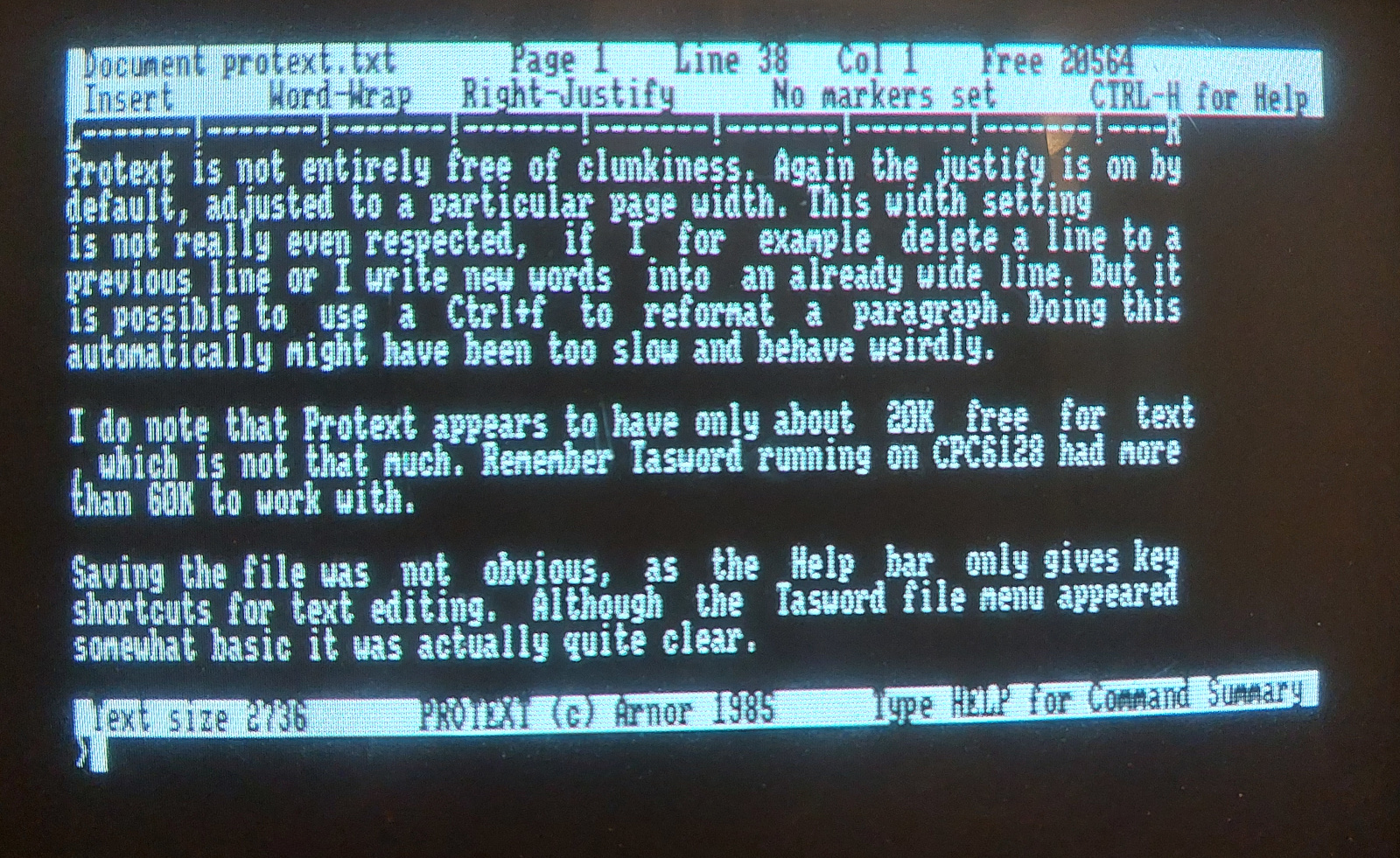
Protext is not entirely free of clunkiness. Again the justify is on by default, adjusted to a particular page width. This width setting is not really even respected, if I for example delete a line to a previous line or I write new words into an already wide line.

But it is possible to use a Ctrl+f to reformat a paragraph. Doing this automatically might have been too slow and behave weirdly. I could also easily turn the justify off and have more normal looking text-editor paragraphs. Perhaps the software works a little faster for it, too.

If I turn off the word-wrap with Ctrl+w (not mentioned on the help bar), the cursor keeps going forever to the right. So only if I press return the pararaph will be completed, which is kind of correct, but it is not visually a very good solution.

I do note that Protext appears to have only about 20K free for text, which is not that much. Remember Tasword running on CPC6128 had more than 60K to work with. I'm not out to write a novel anyway, these tiny blog posts take about 2K.

Saving the file was not immediately obvious, as the Help bar only gives key shortcuts for text editing. Although the Tasword file menu appeared somewhat basic it was actually quite clear. However, the problem was not huge. Pressing ESC gives a kind of command line interface together with the possibility to have HELP. Using S will prompt a filename and save the file.

Moving a paragraph is not more complicated than with Tasword. Bonus points for using the actual COPY key that is featured on the Amstrad keyboard. Shift+COPY creates markers for both start and end, then Ctrl+M moves the area.

A somewhat more general problem with Amstrad text editing is that the computer does not have separate backspace and delete keys, the single DEL key instead acts as a backspace. Pressing shift+DEL does not result in forward delete, unlike I had hoped.

So, on with Protext until something better comes along. I might still give Tasword a chance, given I can find the options for making the software behave faster and better. However, even then the Protext overall typing and text editing experience is much better.


Afterthoughts (written in Blogger)

This time I fixed a few typos in the above text, as they made the sentences unclear. I already know that a few typographical errors, repeats, mannerisms and other brain farts get through when I simply write the whole piece from top to bottom. To me the idea that the text editor might influence overall composition, is more interesting.

I had some trouble with transferring the file to Linux. Firstly, I realized I had to use the PRINTF command to "print" the output of the document to a file, this way there are no command codes and such that might result from using the S-Save command.

The first resulting file was corrupt, but this may have been because the disk image I used in HxC was not valid enough. I'm also thinking the converting tools were not up to the task, as the Protext on Amstrad side seemed to read the files back happily.

Using a more "clean" empty disk image I got the file out. Just as with the Tasword file, I did some manual work removing the returns from line endings, here I also removed the tabbing and page breaks. Again, there was also some junk at the bottom of the file.

Tuesday, 19 July 2022

Handlebar mod

Although I have liked the wide handlebar, at 60cm it's perhaps just a little too wide.

For fun, I also measured the handlebars of various rentals. The measures are not accurate to the millimeter, I used a tape measure and it was not always simple to get an unobstructed measurement.

Voi  60cm
Lime 60cm*
Ryde 55cm
Tier 52cm
Dott 52cm
Bird 52cm

*) The handlebar is curved, I measured the straight line from end to end.

From top left, clockwise: Voi, Tier, Dott, Bird, Lime, Ryde

The comparison isn't very meaningful as I have only tried the Voi. But it looks though the 52cm is more common. 

Interesting though that Voi should increase the width. Last year's Voi rental kickbike had 56cm width (I measured it).... but, strangely enough, this year's model appears to have 60cm wide handlebar.

If there's any new observation to be made here, it's that the handlebars are always somewhat ahead of the stem, which is not the case in the Zeeclo.

The 52cm is likely impossible to achieve, and perhaps not even desirable. But I could comfortably take 4cm off, if possible, making it 56cm.

The major constraint here is collapsing the handlebar, as the two "pull-out" components need some space to move. The above shows the parts (red) extended, demonstrating how little room there are for the various parts on the handlebar.

Although the left side has generous 30mm free room, the right side is crowded. After considering this from a few angles with CAD and pencil sketches, I decided that if I take the display out (the green part) I can do the cut. 

The grips were again pulled out, and this was not as arduous task as last time.

There are plastic caps at the end of the metal pipes, after removing these I created a 20mm trace round the pipe using a vernier caliper and a paper knife.

Then it was just sawing off with the hacksaw. The blade was Sandflex BI-METAL 24TPI, which, judging from the diagram, should be fine for hollow pipes with some material thickness. (22mm pipe with 2.7mm walls here)

I was a little rusty with the saw, but the second cut was already quite fast. With a hacksaw, the angle of the saw is not necessarily the angle of the blade and the cut. I took care to create a good vertical cut from the beginning, so it would act as a guide for the rest of the sawing. 

I guess the ends ought to be covered with paint, but I might still cut off a little more.

Putting the rubber grips back, I noticed it can be useful to cover the "airhole" at the end of the grip with my palm. This creates an airbuffer or something that allows the grip sink in very rapidly and easily. This felt counterintuitive as I thought the hole is there precisely to allow air out.

For a few days the display was simply left dangling around the wires.

Test Drive

I felt this change improved the handling of the kickbike. I could take the tighter turning arcs more comfortably, and it is even possible the handlebar is less shaky.

The height of the stem was accidentally changed too, so I can't attribute everything to just this one change. Looking at past photographs, it's not that different though.

Wait, there's more!

There's the issue of the loose speedometer/computer. The local shops had a surprisingly few handlebar extenders. GoPro camera owners are well catered, but there's scarcely anything else. I couldn't see good parts in the hardware store, so this time I abandoned the DIY angle.

eBay to the rescue. After browsing a while I could find a shop in Ireland that sells these handlebar extension racks in 10cm and 20cm varieties:


The 22mm pipe is extremely flimsy, but it doesn't add much weight either. The clamp is 8.5mm wide, which is rather good.

Below is one of my first attempts. Good sense says the display might be better near the center, or at the right side, but I couldn't resist putting it here among the other controls.

The clamp is in an unorthodox place, around the moving bolt. However at this point I don't have the 1cm space in the handlebar!

As I mentioned this could be fixed by having shorter rubber grips.

These grips are 13cm, but can be easily cut into 11cm without breaking the appearance. These grips didn't feel that great to the skin, but I can at least use them to test the idea.

The grips were not as easy to push in. Halfway through I gave up, and then I couldn't get it out!

Fortunately the material is so rubbery I can roll it inside out. This also gave me an idea of how to install the grips, should I want to use these.

But I will save these thoughts for another time.

Thursday, 14 July 2022

Tool time: Drill guides

I got a drill guide and a doweling jig, after a situation where these might have been useful. But I can at least blog about them.

In the past I have managed with drilling through a wooden block and using that as a guide, but these ad hoc pieces easily get lost and mixed up.

When ordering from the internet, half the trouble is knowing the Finnish words for some items. Again, when writing this blog, there's the added trouble of finding the English words.

So:

Wooden dowel pin : Poratappi
Drill Guide : Porausohjain
Drill Stop/Depth Stop: Poraussyvyyden rajoitin(!)
Dowel joint: Tappiliitos, Poratappiliitos
Doweling Jig/Dowel Gauge : Tapitusohjain
(Dowel drill) centre point : Tapituskeskitin
Hex key/Allen key/Allen wrench :  Kuusiokoloavain

Often Google Translate can't figure these out correctly, and the terms are not certain to begin with. According to GT, tapitusohjain is "Tap Controller", and poratappi is "Drill Pin".

Looking at item lists of complete doweling kits was the easiest way to reveal the terminology.

Dowel joints aren't exactly the state of the art, but they can be done at home without huge tools. At least somewhat precise positions and 90 degree angles are needed, so guides like these can be handy.

First, the Wolfcraft Dowelmaster jig:

This jig has an adjustable/removable block that helps position the jig against an edge. Then I can drill 6mm holes through the device.

The drill stop is almost necessary for preventing accidentally drilling through the material. The stop is tightened in place using a tiny Allen key. It did keep falling out, though, it would work better on the non-bladed area of the drill.

At this position drilling the right hand side was rather easy. To make a 6mm hole at the left side was trickier because the tool can't be mirrored. (The holes are for 6, 8 and 10mm pins respectively)

Drilling the holes through the edge was little harder, it would be helpful to have the piece attached somewhere.


As can be seen my test joint is not very precise. But the result was ok considering the wood was not very even or cut very accurately, I wouldn't blame the jig here.

The idea of keeping the device at place with your hands is fast, but also kind of crap. Especially here when working with small pieces I kept trying to find a good position.

There are more straightforward jigs that can be clamped to the piece. But the Wolfcraft jig has a few tricks up its sleeve. The contraption can be held diagonally against the edge of the wood, the edge held firmly within the "X" shape of the jig. There are two ways to do this depending on the thickness of the wood. The pinhole position can't be adjusted but at least the holes will be equidistant.

I liked the simple drill guide. ("accumobil Mobile Drilling Aid") It's not specifically made for dowel pins, but it does have the 6,8,10 sizes.

The device is better used upside-down, because what looks like the top works better for the special cases of drilling into a corner or a round object.


There are also marker lines around the guide. If you want to use them you have to mark your boards very generously because otherwise they are not very easy to see. 

Here the wooden piece is so small I couldn't even check the lines from all directions. It may be a better to make ~2mm deep initial drillhole and then finish the job with the guide.

Here I also made use of the drill centre points, these small metal pins.

The idea is that the drill hole positions don't need to be super-precise. Drill holes into the first board, then put the centre points in the holes. The second board (edge) is pushed agains the pins and the drill locations will be correctly marked.

For the edges, I again used the doweling jig, and I wasn't very comfortable with it but the result was fine. It would work much better if I had gone through the trouble of clamping and positioning the parts with more care.

So, altogether these felt robust enough for my purposes.


Addendum 15.7.2024: Having used the Dowelmaster more it worked fine enough. The adjustable fence is ridiculously low compared to some similar models I've seen. In some situations this may save space but here end-wood doweling felt risky. The weird shape of these objects can prevent creative clamping. Also, adjusting the position would be easier if the tools were more rectangular. I checked the clamped position using a light, peering down the jig hole.

Thursday, 30 June 2022

Summer update


After having the eletric kickbike for more than six months, I have barely 150km in the odometer. During the hot and dry summer days this might change.

I still occasionally use the voi rental scooters, because it is sometimes just handier to not stress about the parking. Although, with the attention now given to mis-parking, it can be slightly stressful too. Also as the number of rentals in Helsinki is growing (voi, lime, tier, dott, bird) I'm somehow happier not having to think about them.

But the voi handlebar is really stable compared to my "zeeclo". In fact it is one of my on-going gripes with this model, it is somewhat shaky and needs to be aligned with the wheel from time to time. I mean, how difficult it would have been to design so it wouldn't rotate at all?


I bought a modest lock that should prevent the simplest thieving actions. 

But I haven't decided what would be the best solution here. Collapsing the kickbike perhaps draws less attention to the vehicle and could discourage people from fooling with the controls. However, in this state it could be carried rather easily away after cutting the lock.

Apart from the lock, I have bought an electronic pump to adjust the wheel pressures. This I will discuss separately at some later time. 

Let's just say I avoided the weird generic instructions at the Zeeclo website which suggested the wheels could be set at 50-60PSI. It might not be applicable to the Zeeclo Fenix at all. I instead followed the value of 35PSI found on the wheels itself. The vehicle is marginally faster when there's more pressure in the wheels.

I would have taken it to the workplace earlier, but the elevator was fixed only recently. It barely fit into the small space of the elevator! Mind you, the distance to work is so small I barely need the scooter for my commute.

I have kept quite accurate record of my travels. Without making it too obvious where my homebase is, I combined the extents of my journeys into a single image, courtesy of Google Earth and the handy "path" function.

The map doesn't mean I have driven extensively in the city centre. On the contrary, I have mostly avoided the central areas, instead favouring dedicated bike routes even in cases where they make the trip longer.

The supposed 20km range (10 there and 10 back) gives some limits to these trips but I have not really even used this range yet.