Thursday, 19 January 2023

Giana Sisters 2D/DS

I played Giana Sisters 2D through Proton/Steam on Linux, and on the force of love for the C64 original I could complete the game and even enjoy it in parts.

In concept it's not that different to the original Great Giana Sisters, jump and run your way to the end of the level and collect diamonds as you go along.

With this PC version it's just that the graphics are vector-based and more mobile-like, and somehow I felt the general level of polish is not as high as it could be.

As this is a re-versioning of a 2009 Nintendo DS game, I became curious enough to order the game off eBay and borrowed a Nintendo DS hand held console to see how this really plays.

Let's dive in.

It was more easy to take screenshots from the "2D" version.

New Coke, New Giana

For the new Giana, the designers made an important streamlining. When becoming "punk", Giana gains both the head-butting ability and the fireball. You can also shoot multiple fireballs, importantly the power acts as a kind of one-hit shield so Giana does not instantly lose a life.

There are no additional bonuses for creating reflecting missiles, homing missiles or the one-off bonuses found in the original game. This means it isn't so devastating to loose your "punk", as the next bonus will bring it all back and there's nothing further to build. Admittedly some nuance is lost here, but this change helps make Giana Sisters more playable on the long run.

From the start we see the game can scroll vertically too, and although many of the initial levels are horizontal they can be traveled back-and-forth, unlike the C64 game. Later the levels expand to all directions, steering away from the original level styles, but admittedly they bring some needed variety.

Part of the World Map

One central new idea is the occasional red diamond found among the usual diamonds. This is not only a nod to the Amiga version which had red diamonds, they are special jewels. Collect all from one level, and you have cleared it perfectly. Clear all levels in a world to perfection, and you can access a bonus level of that world.

The red jewel is also why some levels are worth exploring forwards and backwards, up and down. Later it will become increasingly hard to discover all the red jewels. You can play a level again if you didn't clear it perfectly the first time around. This adds some replay value as I just didn't care when sweeping the levels on the PC 2D version.

The red jewel is also a likely reason for why the time counter for levels is extremely generous. You can leisurely explore the whole area searching for those hidden jewels. Still, I got the feeling no-one really tested meticulously what would be a good amount of time for any given level, so they just gave a bunch.

Extras

There are also two additional tools for Giana. First, it's possible to get a bubblegum or a soda from a dispenser. The former allows Giana to float in a balloon, whereas the soda produces a Turrican-style beam of water that can be rotated momentarily around Giana. 

Wheee!

Here some of my problems begin, at least on the PC version. Floating on a balloon, avoiding sprites, is something that I could have cooked up as a C64 BASIC game in the 1980s and the movement is just as sluggish. And of course there has to be at least one hell-hole of a level that requires the player to navigate the balloon in a corridor of spikes and flames and bees. The 8-8 level particularly can F.O.

The DS version at least has better controls and Giana doesn't jank around in the bubble when flying. It still doesn't become my favorite part of the game. There's an option to use the microphone to blow the balloon upwards, but I shudder even to think of this.

The Soda gimmick is mostly just a "key" to open areas, as it washes out breakable walls and obviously blows out any flames. It's said to push monsters too, but at least the crabs didn't seem to care much about it and I ended up losing a life because of this misinformation.

Splosh. Also, the inevitable glitch.

The two extra items didn't do much to the Giana experience, but as a way to open bonus areas they are more inventive than just plain keys or warp items. On the DS, having to press the touch screen to activate the bubble gum does not add much, or actually nothing. 

The game doesn't make much use of the double screen anyway. The information and world map is at the bottom screen, which means you have to slide your eyes there to check if you have all the red diamonds. So, it's one area where the PC version could be said to be better.

Both versions have a look up and look down function, which in theory adds to the process of searching secrets on some levels. It tends to be a bit useless, although fortunately not too distracting.

Levels and difficulty

Part of the main game levels are clearly based on the original Giana Sisters material, and I enjoyed these the most. Although it also felt like visiting the ruins of a partly abandoned gianaverse. These tribute levels have no warp tiles, and although the spaces for the spider and the dragon bosses are there, the bosses do not appear.

Instead the Dragon, now somewhat flatulent, makes an appearance in a separate sub-level, where you need to jump on top of the dragon to kill it. In the Nintendo DS version, the Dragon is more formidable. It moves faster and swoops down on you on the first instance. With the PC game, I felt that nearly all the dragons were quite simple up until the last one or two. We don't get to see the giant spider.

Amiga-esque

The difficulty ramp is one of the more annoying aspects of the game, at least on the PC version. With DS I can't say much because I'm in effect playing the same levels again with better controls. Although at times the small screen makes things harder to see than on the PC.

The PC experience was that for a long while the game is mind-numbingly simple, playing lazily I still had 10+ lives at my disposal. Suddenly it becomes significantly harder and not always in the way I'd hope for. The typical way to die is to bump your head at a thing you didn't properly understand, ending up in a chasm instead.

On Nintendo DS I had 20+ lives at one point. It's possible the balancing of the game and the amount of content is not exactly on par with best console jumping games, but it's a Giana game alright. It may be that as I spent some time in summer to complete the C64 version, the new game felt comparatively easy.

One more detail about the version differences. When the bouncing spiky balls are first introduced on PC, I thought I would have to jump over them much like the similar opponents in the original game. No way this could be done, and I lost many lives trying it. Then I realized I have to go under them instead. Funnily enough in the DS version these spike-balls jump considerably higher and it is more obvious you can pass under them. Hmm.

On the Nintendo DS

The prize for least welcome new enemies are the ghosts, as they simply float around in broad circles larger than the screen, and disregard the physical world around them. They also figure into the "avoid sprite" game mechanic territory which feels a little out of place. I don't think there is a precedent for them in the Giana lore either! My opinion didn't change much on the DS, as added vileness they are maybe even less easy to see.


Looks and feels

The PC version has a "retro" Giana level set, which remixes the original game levels more consistently, but with the new controls and monsters. And a remix it is by necessity, not all the monster types are reproduced, the secret cave logic isn't the same, and so on and on. The DS version doesn't have this game option as far as I know.

The vectorizing of elements on the PC has not been always successful but there have been a few bright ideas here and there. For example, using an airbrushed look for some of the graphics, harking back to that weird Giana Sisters Amiga game cover and loading screen. Then again some of the grass splotches and plants look horribly ill-defined.

Squish those eyes

I'm glad the game is not pumped up with some kind of between-level narrative or text, although for some people this might be a minus. After playing further it's apparent Giana Sisters DS/2D is not a very complex or content-rich game. In this way it further reminds me of the Commodore 64 days.

On Nintendo DS, it is even more apparent how close this actually is to the Commodore 64 game, especially the early levels. The pixel graphics and the atmosphere are spot on, the controls are similar but smoother.

On the other hand, the DS screen is very tiny and not super-high quality. In a perfect world I could somehow play this exact DS version on a CRT monitor.

The DS has nicer looking Giana sprite, and the "punk" version has better attitude and animation than the PC 2D. Truth be told not all the levels look very grand on the Nintendo either, some underground tunnel levels are not on par with the best outdoor ones.

Verdicts

If I'm generous and have my nostalgia lens on, I could see Giana Nintendo DS as a 8/10 game. The PC "2D" version could be a 6 or 7/10 -ish, it still gives enjoyment especially if you're on some kind of Giana binge.

Giana timeline:

1987: The Great Giana Sisters

2009: Giana Sisters DS

2012: Giana Sisters: Twisted Dreams

2015: Giana Sisters 2D

2015: Giana Sisters: Dream Runners

Wednesday, 11 January 2023

Karl Bartos:The Sound of the Machine


I had a German language edition of this 2017 book already a few years back, but after struggling through few pages I gave it up. Now I'm holding the 2022 English edition in my hands.

Although this is an artist autobiography of Karl Bartos, it also tells the story of Kraftwerk from his perspective, and how it befell on him to join Ralf and Florian's project as an electronic percussionist.

As the story goes, Autobahn became a hit in the US, and the band embarked on a tour over the Atlantic. This likely provided them with a great bonding experience that helped establish Bartos (and Wolfgang Flür) as regulars in the lineup. Perhaps it also convinced the foursome that Kraftwerk had a future at all.

Bartos shared writing credits in many songs during the productive era, so this book could potentially shed light on how the works were created.


Starting the machine

About fifth of the book is dedicated to pre-Kraftwerk days, starting from childhood and tracking Karl's increasing musical competence and diversity. At one moment he could be doing pop and rock covers and backing work with the Jokers on a national level, then playing a vibraphone at a classical concert. The main message here is that Bartos not only had experience as a practical musician but was really the only "theoretically" trained musician in the line-up. The story of applying to the conservatory is amusing, as it doesn't sound very formal.

This background allows him to assess that Ralf and Florian were not big on music theory. More importantly, they instead applied a kind of minimalist art sensibility to sound, arising from the growing kraut/cosmic/psychedelia scene doing rounds in galleries and other unlikely venues.

This is not to say Ralf and Florian were "ordinary" people, as they were embedded in the cultural scene of Düsseldorf, and apparently had more money than most of their experimental contemporaries. Bartos describes Ralf as having a keen entrepreneurial eye over the Kraftwerk project, perhaps for both better and worse.

Whatever the reasons, Kraftwerk achieved a remarkably consistent "European" interpretation of pop-sound, stripped of blues and rock influences, even shedding the psychedelic/cosmic aura in the process. If Kraftwerk did anything "first", it was perhaps this consistent portrayal of themselves as a synth-only band, producing album after album of quality music, paving way to a future where electronic music was no longer esoteric or one-off novelty.

The Magic formula

As the book turns to the Kraftwerk years, the narrative becomes a chronology of events using the album releases as milestones, examining individual songs. A common structure in Kraftwerk literature, however having Karl Bartos recollect it makes it more interesting. The book doesn't really try to explain how Kraftwerk came to be, but he gives a summary of the earlier days.

It is instantly clear that Bartos won't explore all songs in great detail. On occasions there are interesting recollections about how the songs were put together and who did what, whereas some are passed over almost completely. For example, he has nothing to say about the Paul Hindemith melody quote in Tour de France, glossing it over as "film music".

Possibly Karl doesn't want to fabricate things where he suspects his memory wouldn't serve him right, but at times I felt the book could have been a little more colorful when describing encounters with other artists. Instead, Bartos occasionally digresses into historical sidetracks, explaining the origins of electronic music, musique concrète, the presence of onomatopoeia in classical music and the life and times of Wernher von Braun.

I don't mind, these add tapestry to what could have been a very one-dimensional autobiography. But for example, an even more accurate description of their studio and song-making processes could have been of interest.

Bartos interprets the "golden years" of Kraftwerk as resulting from the equilateral triangle of Ralf, Florian and Karl himself working creatively and informally in a state of flow in the Kling Klang studio at Mintropstraße. Whereas the initial concepts, melodies and lyrics could be brought to the table by Ralf, Karl would work from his experience from both classical and pop worlds. This was not limited to percussion. Florian would tinker with sound effects, vocoders and speech synthesis–not a small part of the band's signature sound.

Karl attributes a lot of the development of the late 1970s Kraftwerk sound to sequencers, for example the Triggersumme and Synthanorma, which could handle increasingly complex loops in those pre-MIDI times. It is then not surprising the band would continue to follow new technical trends in order to rejuvenate their interest in music-making.

Somewhat closer to my blog themes, from the late 1980s MIDI-era Karl mentions Sequencer Plus (Voyetra) as his software of choice, an early graphical and mouse-compatible MS-DOS sequencer, yet based on the text mode. In an interview from 1998, available on the SoundOnSound website, he discusses his "little Yamaha C1 music computer" with 8 MIDI out ports, which he still used 10 years after its release with the same software running in it. I didn't know Yamaha had another go at the Music Computer concept after the CX5M MSX.

Without Karl really saying so, the various technical apparatuses might be considered the "fifth" member of Kraftwerk. Obviously there were a number of important sound engineers and associates that could also fit in that role. The currently touring personnel Fritz Hilpert and Henning Schmitz emerge from these positions and have in fact been associated with the band for a rather long time. Emil Schult, despite (or because) being a visual artist, could also have a claim of being a 'werker, and he also shared songwriting credits.

Oh, and although Kraftwerk had bespoke gear and the impressive Kling Klang studio set, they didn't really "build their own synths".

As is usual in Kraftwerk literature, the album Electric Café is cited as a failure. Bartos is perhaps more entitled to say this than most, and I can understand it from an artist's point of view: Five years were spent tinkering on the record and it barely visited the charts.

Karl gives a lengthy interpretation of the album's failure as a combination of forgetting the aforementioned music-making methodology that led to the successful albums, the poorly thought out renovation of the Kling Klang studio which also encouraged working in a detached way, and the insistence on trying to replicate or improve on the synth sound now ubiquitous in the charts. Bartos also feels that the increased focus on dancefloor music was harmful to the developments.

To me, even if a commercial and critical failure, the album perhaps aged better than many contemporaries. In an age when the "warmth of analogue sound" has become a saturated cliché, this cold and stark echo-chamber of digitalized musical ideas feels novel in comparison.

Later Years

Karl Bartos was hungry to do more musical work, with or without Kraftwerk, but as Ralf and Florian put an embargo to any solo projects, he felt he had to leave the band behind. It happened surprisingly late considering how problematic Bartos saw the situation already in the early 1980s.

It is astonishing that the band did not do concerts for almost ten years, at a time that appears in retrospect as the peak of their creativity. But as Bartos tells Kraftwerk didn't get huge audiences with their early 1980s gigs, and with the bulky gear they had the motivation to tour must have been low. After the success of The Model there might have been more demand, but apparently Ralf refused to tour.

How could anyone have known that months would turn to years, and years into a decade. A decade that sported an isolated single and a strained album release, culminating into the retrospective self-remix album The Mix. In some ways, the process of "cataloguing" the Kraftwerk sound had already begun in mid-1980s.

After leaving Kraftwerk, Bartos has done a surprisingly large number of projects, solo albums, remixes, production work and other appearances. For those who didn't actively follow the "ex-kraftwerker" career, this output was likely not very visible.

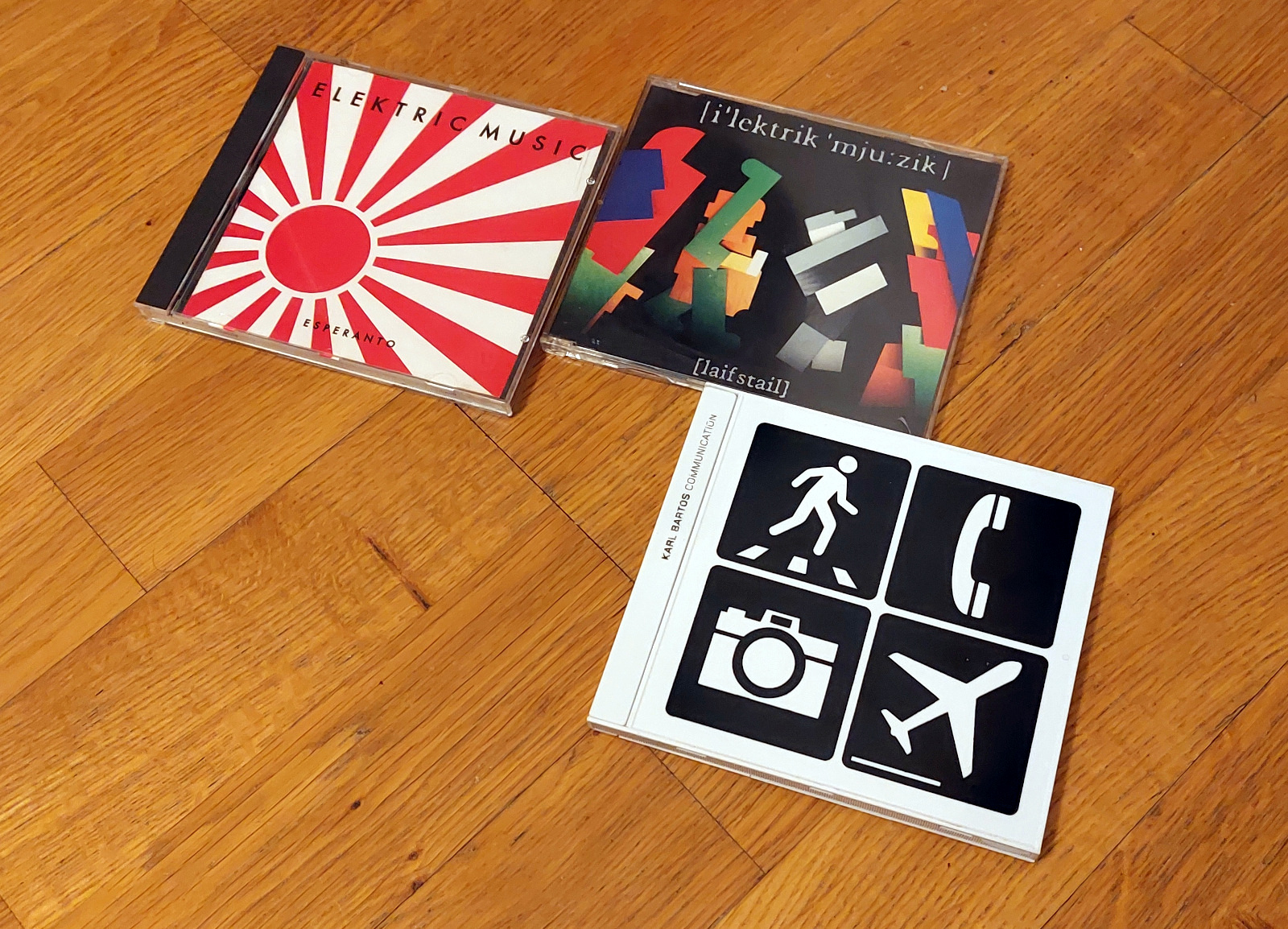
But even I was aware of Elektric Music, the project between Bartos and Lothar Manteuffel of Rheingold fame. Esperanto was a good straightforward electro-pop album in the vein of OMD and Depeche Mode, decked with a recognizable Emil Schult cover design.

Despite having material towards a second album, the project broke up. Considering how much Bartos discusses the dysfunctionalities within Kraftwerk, it's a pity the closing of this chapter is not explored in more detail.

The solo album Communication from 2003 was unfortunate in that it co-incided with Kraftwerk's Tour de France Soundtracks. Bartos laments the timing and being overshadowed by his former band. Although the album is solid, I felt it was burdened with the somewhat heavy vocoder/robot sound.

The book doesn't discuss Wolfgang Flür that much, possibly allowing his story to live in his own autobiography "I was a Robot" from 2000. In this telling it even looks like Flür didn't so much "leave" Kraftwerk, but simply did not bother to come back when his playing was required, instead preferring to focus on his interior design work. I've sometimes wondered why Bartos and Flür did not subsequently collaborate, and the book gives no answer to that.

I am slightly worried that Karl's voice in this book isn't as determined as in some of his past interviews, where he might discuss gear and events in more detail. Has he "bought" the commonly accepted narrative about Kraftwerk, and fills the gaps of his memory and notes with it? How reliable is this narrator?

Much like that Wolfgang Flür outing, this book gives just one piece of a larger puzzle. Anyone interested in Kraftwerk needs to read it. But the ultimate mystery of Kraftwerk, if there really is one, does not become really closer to being revealed. Ralf Hütter's public utterings are repetitions of past and mostly intentional riddles anyway, Florian Schneider is dead and can no longer answer questions. Possibly the long-time collaborating sound engineers, touring currently, could add their say.

For a few years, Kraftwerk had a playing field largely to themselves, but as others caught up, many of their ideas could be replicated with world-class engineering and equipment the band themselves lacked. Kraftwerk tried to rise to defend the small hill they so far had occupied, but, the way Bartos sees it, were mistaken about their goals and purpose.

Now Karl is critical of the latest trends in music distribution, which can be difficult for a musician with a 1970s conception of the recording industry. If music becomes ubiquitous, he argues, it is in danger of losing meaning. Such is the price of democratizing the means of sound generation, distribution and listening! Karl's love of music is tied forever to the moment when a person came from over the channel and put a physical disc of Beatles' Hard Day's Night on the turntable.


Off the Record, on record

I also acquired the Karl Bartos album Off the Record, from 2013. Back then I felt no great compulsion to buy the album. After reading the book I had a bigger motive, trying to see the album as a complementary piece to the retrospective writing.

As a tiny tribute to his thinking, I chose to play the disc from start to finish on a CD player, instead of habitually ripping the tracks over to the computer.

The album plays heavily into the idea of Bartos as a former Kraftwerker, an identity he has variously distanced himself from. The backstory of a "secret audio diary" gives the tantalizing prospect that here might be some material from the golden age of Kraftwerk. Yet these are no lost tapes, but new songs based on concepts and material from over the years, an "autobiography in sound".

Glancing at some reviews and comments, some apparently feel Karl's solo output sounds the same as Kraftwerk. I tend to disagree. Although there are Kraftwerk quotes here, to me this is still an extension of the personal sound Bartos developed after leaving the band. 

Yes, it's surely part of the same genealogy and almost immune to any recent trends in the myriads of genres of electronic pop music. Nowadays the idea of equating progress with electronic music appears problematic, so it is not surprising the album does not attempt to innovate but to simply move on.

I felt that listening to the record as a whole makes the music stronger than trying to concentrate on the merits of any individual songs. The more beautiful and intriguing spots are distributed evenly across the album, no one song becomes a real stand-out piece.

Beatles was a revelation to Bartos. To me Kraftwerk was perhaps a similar turning point, something that made me appreciate any music at all, really. But it may be that instead of music, to me computers and TV games were more miraculous and a "lights-on" moment, the "voice of my generation". Encountering Kraftwerk's music and visuals was more an expansion of that experience.

Sunday, 1 January 2023

2022

The customary look-back at a year passed, and mix of themes that didn't make it into a blog post. 

As usual, the blog follows an interest which generally last from a few weeks to about a month or two. The year begun with some C64 related matters, then engaging with Amstrad CPC and writing some text with it. More space was taken by detailing my adventures with an electronic kickbike, a hobby which unfortunately took a badly timed hit after having an accident.


Programming, Pictures, etc.

Despite not releasing any programs or games this year (when did that even become granted?), the new version of Multipaint is still under construction and I have hopes of getting it out soon-ish.

Some of the biggest developments are not even intended for release at this point. There's a companion piece to Multipaint, a C64-only editor that should enables sprites, multiplexed sprites, sprites in borders and so on. I have made couple of works that relied on this new program.

Cartoonzone workstage inside Gfxlab

Here I liked exploring the use of both extended and non-extended sprites in the same picture, and finding a fitting context for each.

There's some actual Commodore 64 game goodness coming out too. My reluctance to discuss on-going game projects means it will have to wait, but it's now safe to say it should be complete in 2023.

Then a few examples of C64 PETSCII and bitmap images.

Ego The Living Planet

Above, Ego the Living Planet PETSCII and below Night of the Homeless at the Vammala Party graphics compo. This is a plain hires without sprites.

Asunnottomien Yö

Oh, and one of my older works, Countryside, was printed and exhibited in the Pixeled Years exhibition at the Game Museum in Vapriikki, Tampere, Finland. Some of my other works were included in the rolling slideshow along a bunch of Finnish bitmap C64 art.

Multipaint running on a PC was also displayed opposite to a joystick-driven Advanced Art Studio, to also give an idea to the visitor how the conditions for making images differs. The exhibition, curated by Electric and Duce of Extend, is still running.

The panel discussion at the exhibition, alongside heavy presence and comments at the Zoo'22 demoparty (and an experience in tutoring the platform at a university) did make me reflect on my role as the tool creator. I'm now thinking that the resemblance to a 1980s/1990s paint program is actually a good thing and shouldn't be ruined by trying to add too many features.

Pictures at an exhibition

Talking of Advanced Art Studio, recently I've dug out some of my old C64 floppy disks in the expectation I could find some hilarious BASIC gems and pictures from around 1989-1990. This was helped by SD2IEC SD card reader and JaffyDOS program which allows me to create D64 disk images, using the real 1570 drive as a source.

It turns out the treasure was not as abundant than I had hoped for. The BASIC programs tended to be short and unfinished. It's also tricky to piece together the few machine code and sprite materials which generally don't have any kind of loader built-in.

But there was a nice instant payoff in the form of a couple of graphic artefacts, such as this copy of a cover from a Traveller 2300AD Role Playing Game extension Kafer Dawn.

1990: Traveller 2300AD

I'm fearing that my earliest programs are not present, as my findings looked like they were from a second wave of creativity. Going through dozens of disks, I no longer think there are any significant "lost disks". The floppies back then were mostly reserved for copied games which tended to have priority and I could have overwritten my programs on a whim. The same was even more true for ZX Spectrum tapes, and I have very little or nothing remaining from that era.

I'll return to these in more detail if I get around to examining the BASIC program disk contents.


Interlude

The blog saw slightly more MIDI minded postings recently. It is as if I finally have the kind of setup I envisaged at late 1990s, never mind actually producing something with it. Maybe it is a kind of eternal "garage project".

I have continued to work on a sequencer that combines tracker and piano-roll editing into some kind of fake Atari ST/Amiga sensibility, partially hard-coded to the kind of equipment I happen to have. MIDI only, no VST support. Again, this is unlikely to be released, there is enough such software out in the wild and I don't want to be answerable to this...

Windowman

This project which I've only called Miditracker, and its latest incarnation, Windowman, has obviously been under development before 2022. It has a some sort of genealogy dating back to late 1990s. Now was simply the year when it began to feel more fully formed.

Games

I felt I played less games overall during the year, but looking back it's not true. At the beginning I did complete Control, after which I had a long pause from larger games.

Control

Control was more action-oriented than I expected. Cleverly the confined setting doesn't require so much content creation (I suspect) so the focus is instead on the explosive encounters and modulating this experience almost endlessly through power-ups and weapon variations. The story and the underlying mystery didn't captivate me so much, but the milieu and the relatively banal environment are well done. At some point I simply wanted to be good enough to beat the game.

I still used GeForce Now to stream the game, which was surprisingly doable. But overall I became weary of streaming games. Too random selection of games, the streaming can hiccup and a game can just as well crash remotely as they do locally. After returning to non-streamed games it felt like a breath of fresh air.

Gris

The largest game was Jedi: Fallen Order, which despite some hiccups and crashes could be finished in Linux/Proton. I have to say Linux has come far from Quake and Tux Racing, although in a sense these Proton-games aren't "true" native Linux games. Apparently Proton can run some games better than Linux native versions, though.

Generally, somewhat smaller and just so slightly older games work almost always on Proton without even fiddling anything.

Jedi was a fine game, but surprisingly it wasn't that different from Tomb Raider, or I guess almost any third person action adventure these days. The guy is even explicitly raiding tombs.

Jedi: Fallen Order

Towards the end of the year, I picked up pace and completed Rise of the Tomb Raider, then Gris. The Tomb Raider sequel didn't have the same impact as the 2013 reboot, being mostly more of the same.

Gris was stylish and enjoyable, occasionally utilizing the simplest of 8-bit game mechanics without the frustration and unfairness that often went with the early games.

I also picked up a bunch of cheap games from the Steam sale which is still going on.

For shits and giggles I got Garfield Kart, which I quickly set aside. 

Garfield Kart

Now I'm looking into the Giana Sisters 2D which I bought on the reputation of the DS game it appears to be based on.

However, the rather nice pixel graphics of the DS version have been translated somewhat unevenly into mobile game vector muck. Sometimes it even refers to the Amiga airbrushed cover art, and the music has some of that Amiga twang too. Can't say how the game play differs from the DS version, which I never played, but it does feel a little clunky at times.

At some point I also completed Great Giana Sisters on the C64, something I've not done since the early 1990s I guess.

I have alternatively numbed and irritated my mind by playing battledudes.io, which I might be finally leaving behind together with surviv.io and the like.

Giana Sisters 2D

TV, Books, Film, Star Wars

After getting the Chromecast dongle and discovering streaming apps for Android, we've been watching this and that, opening and closing subscriptions as needed. I've had Netflix subscription quite permanently, occasionally turning Disney+ and HBO Max on/off. 

The apparently final season of Westworld felt more satisfying than seasons 2-3, but I guess there's little to salvage from that concept from now on. 

What else. Stranger Things, Locke and Key, Bridgerton, Emily in Paris, 1899, Manifest, Witcher, Lucifer, Sandman, Raised by Wolves, Discovery of Witches, The Nevers...

Although it looks like this should make me a couch potato, it was achieved by watching one series at a time, 1-2 episodes per evening.

The Doctor in Doctor Who was finally reincarnated. The final hurrah was better than most material from the recent years, but still a far cry from the most glorious seasons. Given the new series has been going for 15 years (sigh), it's not surprising it had to go through a bad patch. Now there's some signs of course-correction, but this isn't usually a very promising artistic direction.

If anything, you'd think Star Wars would be that one pop-culturally over-saturated, over-ripe thing that would better lay down and rest for a while. But I did binge on Star Wars during summer. The expectation of the Kenobi series led me to watch the films in episodic order, up until Kenobi, then after the series I followed with Rogue One, the original trilogy and the sequels. (I left out Solo).

Some of my Star Wars junk

I have to say the prequels felt slightly better than before, whereas my previous assessment of the sequel trilogy as "better than prequels" began to feel doubtful after this proper re-watch. At least the Rise of Skywalker was pretty dire. The film dives into depressing depths through Palpatine's return with a killer fleet, the stupid hyperspace-skipping scene, the Sith dagger plot... Yet strangely the film managed to end on a reasonably high note and cast an arc back to the prequel themes.

Disney+ keeps churning out Star Wars. Mandalorian season 2 wasn't as triumphant as the first one, relying more on cartoonish characters, fan service and pushing the uninteresting Mandalore mythos. Still all in good fun. Book of Boba Fett was enjoyable but tended to derail from its premise and ended up with prequel-style hijinks. I liked Kenobi better, because it was bold enough to take central characters and bring a kind of emotional closure to the Vader/Kenobi interactions the prequel trilogy lacked.

Star Wars: Andor was in some way what I always feared a live action Star Wars series might be like, before any such existed. Talky drama, low on fx and action, 99% planetside... However they managed to make it compelling, mixing genres and ideas not usually seen in Star Wars. What was the Imperial bureaucracy like, mentioned off-hand in the first Star Wars film? What's the world like outside the Skywalker saga and force-users? My main gripe is that as season 2 became a certainty, various plot threads were vaguely non-committal by the end of this first season.

All this re-watching and watching was capped with reading the famous Star Wars "Thrawn trilogy" books. Short verdict: it wasn't that impressive to me. Perhaps you had to be there, a kid in the early 1990s, starving for more Star Wars and buying into the idea this was the "sanctioned, official sequel" to the film trilogy. Bullshit! I do not think these novels would have made a great premise for a film trilogy or TV series.

Otherwise 2022 wasn't a huge year for sci-fi reading, but I did get into Liu Cixin's Thunderball, and lately, Carl Sagan's Contact. At some point I also re-read Fred Hoyle's Black Cloud. Through serendipity, the themes of these books were not that far apart from each other, life careers in science conflict with politics, military and religion.

Thursday, 15 December 2022

HP Elite Display and 50Hz


So I broke my primary display. For a while I suffered an old Benq display with 1920x1080 resolution, but then replaced it with this used cheap-ish 24" HP EliteDisplay E243i with a 1920x1200 resolution.

I was not initially too impressed with it. It is not completely flicker-free technology although the flickering is not nearly as obvious as the one used in the Benq. (And I barely noticed it there until it was pointed out to me.)

On the positive side, it is pleasing as an object, the frames are thin, doesn't shake excessively, pivoting is extremely easy and goes both directions. Connections are Displayport, HDMI and VGA.

But I probably wouldn't write about this without a happy accident: the display has 50Hz refresh rates. 

These only work for the 1920x1080, 1280x720 and 720x576 resolutions. In practice the 1280x720 is used if a 50Hz HDMI is plugged in.

This is desirable for various more or less "fake" retro applications and emulation, as the old computers tended to use 50Hz refresh rate in Europe. I had been actively searching for such a possibility, but gave up as apparently only TV displays have such rates.

For modern displays, having 50Hz input does not always mean the frame rate is 50Hz, as it could be simply some kind of auto-conversion to 60Hz. Also, horizontal frequencies matter. For example, the ZX Evolution computer VGA is quite picky and the display couldn't catch the signal.


Converted image

I first tried an old Composite-to-VGA box and got a very cruddy Commodore 64 image on the display. Despite the poor quality, the frame rate is rock solid, with no indication of stuttering or 50-60 conversion.


Changing to S-video, the image improved marginally.

The box also takes in Y-U-V, which likely would be the best option for this video converter, but the C64 signal doesn't split that way.

Sticking C64 Composite and Luma outputs into these inputs produced a rather stable and crisp, but wrongly colored, striped image. Don't try at home.


Emulators and other boxes

Even with 50Hz, this display will never be on par with a CRT. The most egregious difference is of course the screen shape. Yes, the monitor can be told to do 4:3, which is a bonus, but it won't take the physical dimensions away.

I tried some emulators and the various HDMI-outputting retro gear I have around. This isn't a review of these platforms, just my experiences with the display and while I'm at it, notes on the Arduino joystick adapter.


UAE

Amiga emulator on Linux. The emulator is surprisingly smooth, and tearless after checking on the vsync tick box. But for some software, the frame rate is not endlessly rock solid. Already looking at the Giana Sisters intro screen I could on occasion see the scroll hiccup a frame. 

But during games and the few demos I tested, I could not really see any problems at all. I guess it partly depends on how the sync is achieved at the "Amiga" end too.

The interlaced Giana Sisters intro screen does not "interlace", and on occasions the lines are displayed in the wrong order.

Using the Arduino adapter, I can play games with the Tac-2 joystick, which is a bonus.


Amiga Mini

Yes, this commercial game console works rather fine and can be set to 50Hz mode. 

The interlaced Giana Sisters intro screen is displayed correctly. The screen scaling options are not very sophisticated, so the screen can end up either small-ish in the center or a big screen with scaling artefacts when scrolling.

The Arduino adapter doesn't work here, so I have to use either the supplied gamepad or the Joystick from The C64. Neither are especially good.


Vice

Commodore 64 Emulator on Linux. Vice adapts to 50Hz but on my Linux/compositor the emulator doesn't quite achieve smooth sync. No clue why and there are really no further options in the GUI at least.

C64 is not pure 50Hz so there might be a systematic hiccup here and there, but at times I felt Vice hiccuping a little more than I'd expect. I am also wondering if the emulator creators really bothered to enforce the slight difference, but perhaps cycle exact is cycle exact.

The Arduino joystick adapter works here nicely, though.


C64 BMC

A Raspberry Pi -based "bare metal" emulator with HDMI out. It needed some fiddling with parameters before I could get an integer-based display scaling, fortunately these can be done from the BMC menu itself.

This was not altogether satisfying, as to get a huge screen with integer scaling, the borders had to be sacrificed. If borders are included, then the usable screen area becomes rather small. In many games it matters little as the borders are often black.

I have to say I'm not exactly sure why the rest of the screen can't be used, there may be still something to explore.

Aahh...

As I've modded the BMC to have original C64C keyboard and a 9-pin joystick port, the experience is quite good and I can directly use my Tac-2.


The C64 Maxi

The commercial hardware emulator. With only HDMI out, no doubt it can do the job. There's also a selection between 50 and 60Hz modes, but as I recall this had to be done at the boot.

Selecting the "pixel perfect" mode I get a pleasant enough, unnaturally crisp HDMI C64 image with borders, something that was a little tricky to get out of BMC.

What is less pleasant is that I'm apparently stuck with the joystick that came with The C64, the Arduino Joystick adapter could not be used here.

Apparently to have more HID devices accepted by The C64, there's a workaround but I'm not yet prepared to go there. Still, it's promising that this problem has a solution too.

I get a good image more easily than with the BMC, but the BMC has better joystick options and is possibly a little less laggy.


The Outcome

So, all in all I think the Linux can do UAE rather well, and for more frame-accurate C64 emulation I have two choices with this display.

Monday, 12 December 2022

Another time, another Fostex


Yes, the "red one".

I did once discuss a broken Fostex 4-track tape recorder, which I never really properly repaired. I got a good impression of the Fostex brand and when this striking-looking MR-8 digital recorder was available on a net auction, I blindly hurried to get it. This already some 5 years ago I think.

After the initial excitement of having a multi-tracker strongly influenced by the 4-tracker tape workflow, I felt it was too slow and limited and the box mostly spent time at the back of a shelf. Besides, calling it an 8-tracker is really a stretch. You can only record two inputs at a time, and only four of the tracks behave individually. The 4 other tracks are stereo "bounce" pairs 5/6 and 7/8.

The MR-8 is from around 2003-2004 after all, at a time when a cheap digital recorder became a possibility but the concept was still somewhat marred by tiny memory space, slow USB and card speeds.

Now, for one reason or another I felt it might find at least a temporary place on my desk. There's something fun about listening a recording without even turning on the computer, and on occasions learning to be slower with your methods might even be helpful.


Upgrades

One motive to dig this out was that I found out there are firmware updates. I did the 1.21 upgrade and saw this would allow me to use a 2GB compact flash card instead of the 512MB one installed. Fostex had also supplied a list of cards proven to work, which was pretty nice of them. I ordered one from eBay, a Sandisk brand 2GB card. This would bump the 48 minutes of 4-track recording into a maximum of 188 minutes.

A repeat of the firmware update instructions:

After finding the MR8V121.zip from Fostex website, unzip the file within, and use the USB function of the MR-8 to copy it over to the compact flash. (The MR-8 appears as a sort of memory stick, if the USB mode is on) After this has been done, shut down the MR-8. Then hold STOP and turn the MR-8 on again. Now the Fostex should prompt you with something like "version up", and as usual, you have to confirm it with RECORD+YES. Wait for a while, and after the upgrade is done the Fostex should be again shut down. After turning it on, you should see the version is now 1.21.

A Fostex document suggests turning the "EXTEND" mode on in the Fostex before doing the upgrade, but this might be required if the card has seen some use. My card was nearly empty, and I guess there were no problems even if I didn't turn the mode on.

After upgrading there is an option for auto-delete of undo space, but I left this off for now.

After inserting a new 2.0 Gigabyte Compact Flash card and turning the power on, the Fostex offers to format the card. After this procedure there is more than 6 hours of mono recording time in the normal mode. 

The space use depends on the amount of tracks and how much undo buffer is in use. As should be, the recorder does not waste extra space when not needed. So, if you first record a few minutes to tracks 1 and 2, and then record a few snippets in the middle of track 3, these will only take a tiny amount of memory and not a full track.


Learning to fly

I became motivated to study the device and the manuals a little more, finding some neat functions I had been so far unaware of. The manual, despite having some typos and tiny language problems, is extremely clear and well illustrated.

As an example, I was originally unimpressed with the slow export procedure. You can't simply copy your work in progress using the USB connection. The tracks 7/8 are exported into a specific WAV stereo file, which in turn can be copied over the USB. Creating the 7/8 track seemed to require the re-recording of the tracks using "bounce" function.

But now I learned I don't really need to re-record to 7/8 in real time in order to export them to WAV, as I can simply "copy" tracks 1-2 to 7-8 internally, which is much faster. Assuming all the material is in tracks 1-2, that is! Then again, if I'm using all tracks I could choose to export tracks 3 and 4 to 7/8 too and combine the audio at the PC end.

Anyway, this track-copy function helped me try out different recording parameters and seeing the results rapidly on the Linux side. I also found out that most of the track functions work not only on single track, but on the 1/2, 3/4, 5/6 and 7/8 pairs which makes these tools more useful.

Also, the part copy and erase functions made more sense once I used the internal clock to synchronize a sequenced recording. This way, the recording can be revisited in Bar/Beat timing and not in seconds. I'll tell more about this below.

The sync also could help record tracks separately with accurate timing. For example, record one song element to tracks 1/2 first, then another to 3/4. An optional audible metronome click helps live play.

Using the inertial rewind and forward buttons together with the unresponsive STOP is still quirky. I could have used the good honest cursor keys to step between bars.

Things like the on-board effects processor and mic/amp simulations are perhaps better ignored, as they are not very functional and some of them are simply on-off without any parameters. It looks like everything in the device is geared towards making a simple demo for a performance that might include a guitarist and a vocalist.

For the hell of it, I also tried XLR cables for inputting balanced audio from the mixer, although with the distance of 1 meter it should matter very little what kind of cables I'm using. The XLRs ought to be used for microphones really. But in contrast with instrument cables, I seemed to need less TRIM for Input A and B to get the same volume level, which kind of sounds promising? My ears could not really discern any difference in results, though.

Opening the box

I also felt an urge to look inside the box, as some of the buttons were a little unresponsive. The STOP button and the STORE button have to be pressed hard to make them work. Yet it was clear the switch below the button "clicks" in a tactile way.

Some sawdust particles had got between the LCD and the plastic cover, and this irritated me as the screen's not that big anyway.

Pull out the faders first. The knobs do not need to be removed.

Do not remove the "foot" screws and the "battery compartment" screws. Screws near "Digital Out" and possibly MIDI, do not need to be removed either, but I did take out the latter. (Edit: These do not need to be removed.)

There are screws at the bottom and back that need to be taken out. The three bottom screws near to the back connect to a metal plate that needs to be detached later. These screws are somewhat longer than the other. (When putting these three back, put them loosely in before tightening them fully, otherwise one of the holes may be mismatched and it will be difficult to fit.)

Then the red cover should pull out together with the LCD and the fader/button unit. After disconnecting the mic leads and the two ribbons, the parts can be pulled out entirely. I found it easier to unscrew the mic rather than try to disconnect it from the circuit board.

Then, more screws need to be taken out to detach the LCD/fader unit from the plastic cover. There's also a protective "silver cardboard" which probably does little or nothing to remove interference.

After cleaning any visible dirt and putting it all back together, the STOP and STORE button did not become markedly more responsive. Possibly the switches have become worn out. I did manage to clean the space between the LCD and the transparent cover, so there are no longer any particles there.

Possibly, to repair the buttons I'd need to replace the microswitches on the circuit board. They did not appear in any way loose, and the one-piece plastic contraption containing all buttons didn't look damaged.

5.2.2023 Edit: I took a closer look, and re-soldered the tactile switch connections while pushing the switches closer to the board from the topside. This improved the connection and the STOP/STORE buttons now work with lighter touch. The switches are 6.2x6.2mm with top measured varying at 4-4.5mm because of the way they had been soldered in. With only two pins as the poles it would not be surprising they might come loose easily.

MIDI clock-based recording

The Fostex has a MIDI out port, a feature I had not previously used. I recall this caused some initial confusion in me, why does a recorder have a MIDI out port? But it's actually rather obvious. The port transmits the MIDI clock to a sequencer and it is possible to make timed recordings this way.

A song can have a tempo and time signature map, so the Fostex is not limited to one overall speed or time signature. After making these selections and recording a synced track, it's possible to switch over to the Bar/Beats notation instead of the hours/minutes/seconds timing.

There are even two kinds of sync methods, the simpler MIDI clock and the SMPTE/MTC. I used the simple clock, and it looks like to me for recording a complete song it should be sufficient and uses far less MIDI bandwidth.

The simple MIDI clock sends start/stop/continue signals and a continuous "click", all using single-byte signals. 0xFA for start, 0xF8 click, 0xFB is continue and 0xFC is for stop. Other MIDI message contents are always seven-bit, so even if a click arrived mid-message, it shouldn't be difficult to parse. 

For a 4/4 time signature, the click byte is sent 24 times for each quarter note, giving a resolution of 96 for one beat. 

Frankly, the alternative MTC format looked rather complex, as it sends portions of the time stamp little by little. The sequencer may even need to interpolate these and "lock on" to the signal. The plus side is that it becomes possible to start the playback from any location. In the simple clock mode the Fostex doesn't send the SysEx for song position. On the topic of MIDI timings I used Francis Rumsey's book Midi Systems & Control, 2nd edition, from 1994.

When the START signal is sent (by pressing Play on Fostex), Fostex can be told to wait for a couple of empty bars before the click signal begins to roll. For my sequencer, this handily means the MIDI data can be rendered and linearized for playback, which can take a tiny moment. As the sequencer receives the click, the virtual playhead is advanced and MIDI out signals are sent to instruments.

After pressing STOP on the Fostex, the click is no longer sent and the Stop byte is send via MIDI. This can tell the sequencer to stop worrying about the incoming clock, or something.

One obvious use for this when importing the Fostex-exported WAV to a Sequencer/DAW, here for example Qtractor. After setting the tempo I have the track laid out according to plan.

Working with the bar/beat model, it's also possible to make better use of the Fostex Part erase/copy/paste functions. Usually the A and B positions are meant for working on a song position, such as re-recording a portion with multiple takes. Here the A->B positions signifies an area to be operated on a single track, and they can "snap" to beat resolution. This way I could remove a few bars out from a track, or even extend the song further by copying more material to the end.

Also, I recorded separately a bassline to tracks 1/2 and percussion/other stuff to 3/4, from the same song, and the result sounded pretty accurate to me.

So in theory, a song can be constructed using already recorded short elements. This might be silly in this time and age, but as a zen exercise in patience, it might just spur someone's creativity.

Wednesday, 16 November 2022

Korg Nu:Tekt NTS-1 ma:SSaKred

128mm wide, 78mm deep, 17mm high (excluding controls)

I got this about 100€ tiny brick of a synth, Korg NTS-1, or Nu:tekt. You build the case yourself and it has that rugged circuit board aesthetic. There's also promises of customization, both in hardware and software.

So, is this the Arduino of synths? Well, yes and no.

Yes, because it can be modified, and there are pins for accessing inputs and outputs. Yes, because it is very tiny. No, because the software architecture uses uploaded modules and it is not as "open" as an Arduino is. Yes, because you can also compile your own modules. No, because there's not a huge row of pins to access every meaningful aspect of the synth.

NTS-1 is not unique, there are several build-yourself-a-synth models around. The self-building aspect is at least partly a gimmick. But it's a nice product idea, potentially bringing the cost down a little. NTS-1 was really simple to put together with the instructions, no soldering or extra tools were needed. I used a somewhat larger screwdriver than the one supplied.

There are a few pins and soldering points that can be used to expand the synth. MIDI, audio and the sync clock are present both as ports and on-board connections. The real changes to the sounds and functionalities are done through uploading different modules.

I had somehow thought I could also use Nu:tekt as a MIDI-controlled adjustable filter, something you don't see that often. To my disappointment the audio-in is diverted to after the filter, and you can only select whether you want mod/delay/reverb affect your audio input.

But this is not the end. It is possible to upload new oscillators, modulators, delays and reverbs via the Librarian app. So I could add third party filters from DirtBoxSynth just to fix my grievance. This added some ~€10 to the cost of this device. Whether these filters are as good as the fixed ones, I can't vouch for.

The Librarian app

I also learned the architecture is shared between Korg Prologue and Minilogue, which means there's a wider market for these modules. Not all modules might be applicable for the context of NTS-1.

The Librarian app is only available for Mac and Windows, but fortunately it worked well in my 2012 Mac. A glance at the coding side makes me feel it wouldn't be impossible to compile my own effect (there are tutorials and examples) but it's doubtful I can do the math for anything useful.

Apparently an imported module only fits a particular category, so you cannot upload "bitcrusher" to Delays or Reverbs, it has to go to Mods. If so, I cannot choose to chain the DirtBoxSynth filters with the bitcrusher, it's either/or, because both go to Mods.

Ok, let's look at the more physical side of things.

The headphone is at the other side

The boards and the elements are meant for constructing the default box, so it's not a set of legos. Still, the process is nearly reversible and you are not stuck with the box you built. It should be easy to remove one of the four 1mm side panels, and replace them with your own, for example.

About that "nearly reversible". Because the instructions said so, I cut off the four screw holders from the board corners. As far as I see now they do not need to be removed when making the standard case. So, be aware when building the case you are making a permanent change! 

The controls are integrated to the top panel, which doesn't look too simple. The ribbon keyboard input connector looks a little tricky, attaching an alternative keyboard is probably not going through that route. Either find out what the pins between the top/bottom do, or use MIDI.

Header pins and four screws keep to cover in place.

The NTS-1 has no patch storage, but this is a minor inconvenience, considering all parameters can be transmitted via MIDI Control Change messages. There are Oscillator, Filter and Envelope types, with A and B parameters for each. On top of that you can have Mod, Delay, Reverb, LFO and Tremolo. There is also a rather full-featured Arpeggiator.

Like all the audio and sync ports, the MIDI port is 3,5mm one, with tip-ring-sleeve arrangement. So one of the first customization decisions might be whether you need an adapter cable (be aware of Type A and Type B) or build your own full-size MIDI port using the solder points inside. This is what I did, not long after putting the thing together.

The USB also connects the device to your computer as a visible MIDI device, so whether you even want to use the MIDI port for connecting is up to you.

Adding the full-size MIDI port

The box was even easier to open than to put together. The front or the rear panel needs to be removed before the circuit board can be lifted out.

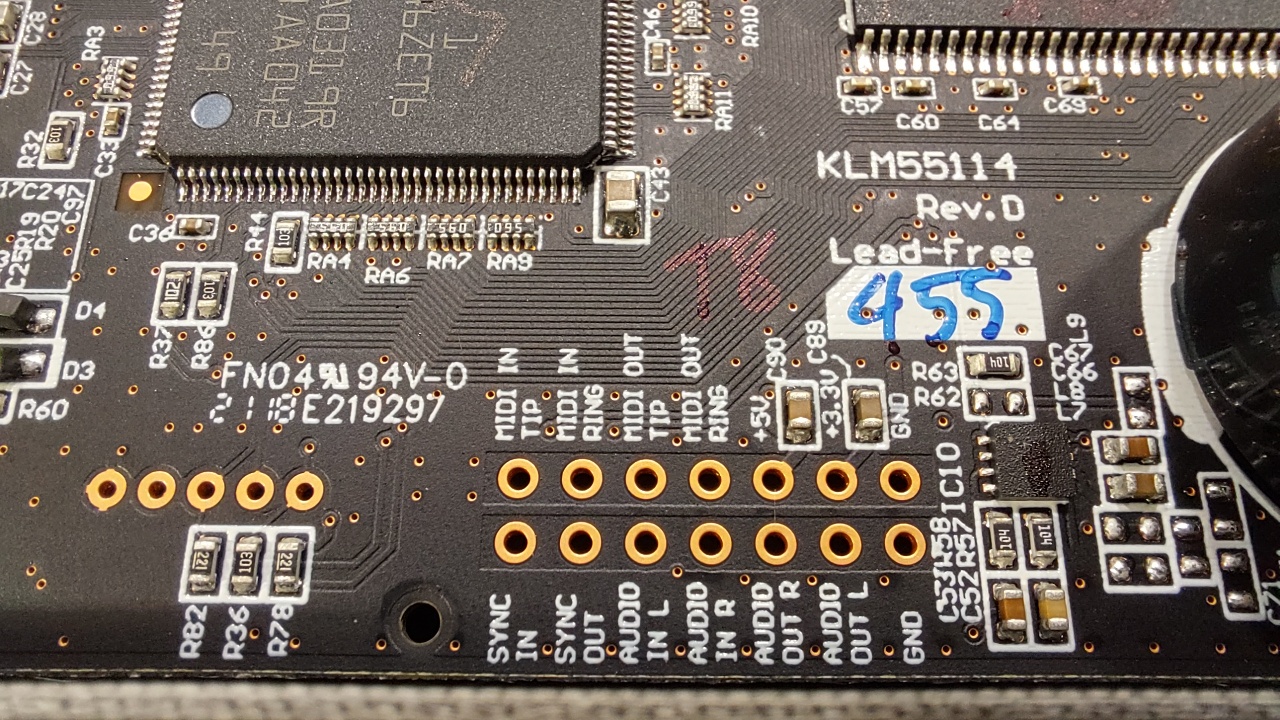
After removing the board it is easy to access the through-holes for MIDI, AUDIO and SYNC. Note that 5v and 3.3v can be drawn from here too.


I soldered in a header strip for testing. Then I realized the jumper cable heads would not fit under the cover, so I instead added a tiny layer of prototyping board. A ribbon connector might have been helpful here.

This way I can solder/de-solder wires should I need to change them. I wouldn't want to heat the actual Nu:Tekt board too many times.

The MIDI in "tip", "ring" and GND("Sleeve") need to be connected to a MIDI DIN-style connector.

I soldered the wires on the proto pads, as it was too tricky to nudge them from the underside after the board had been fit to place. There's one more layer of that header strip keeping the board higher.

I could have soldered the wires beforehand from the more correct direction, though.

Internally, MIDI channels are 0-15, in hex 0-F, whereas software and documentation refers to them as 1-16. This discrepancy sometimes rears its head and creates confusion, but I've become used to it.

How to change the MIDI channel? Consult the manual. Plug in the Korg and press REVERB at the same time, you get to the parameter menu. Find the parameter CHL with the Type knob and change them using the B knob. Push ARP to store the parameter to the internal memory.